VoiceOver Slide Presentations
July 21st, 2021
No comments
He documents some research stating length anywhere from 3-15 minutes.
Link to article from Quality Matters.
He documents some research stating length anywhere from 3-15 minutes.
Link to article from Quality Matters.
I thought this was a creative idea for discussion using what they are calling Digital PowerUps. It might be cool to try this in YellowDig using the #hashtag feature which gets little use.
Check out the Teaching in Higher Education Podcast for some evidence based information, a nice 5 minute recap of what this is and some specific examples.
TOPkit Digest from the University of Central Florida
June 2021 issue: Permeating a Teaching Culture of Diversity, Inclusion and Equity
The Peralta Online Equity Rubric is an exciting tool that I learned about from a recent conference workshop I attended. As noted on their website, “The Peralta Equity Rubric is a research-based course (re)design evaluation instrument to help teachers make online course experiences more equitable for all students.”
We can consider the equity criteria when assessing courses based on the newly added PH Course Review Rubric criteria on “Course materials present examples of Diversity, Equity and Inclusion”.
If you are creating a new course and/or creating materials for an existing course, the following are some things to keep in mind to assure that any materials are accessible to all of our learners.
This UVM Public Health Course Quality Rubric Tool is used to review all new and existing public health courses as part of the Public Health program. The rubric is adapted from the SUNY OSCQR rubric. All courses are reviewed on a regular basis as defined by the program. The review process is collaborative in nature. The faculty member and instructional designer independently review their course, come together to discuss, and identify any action items to be addressed prior to next offering of the course. This tool can also be used when designing and developing new courses.
ALLY is a tool that is automatically integrated into all courses in Blackboard. It provides faculty with feedback about how accessible their files are and creates alternate versions of the files that are accessible to students with a variety of needs or preferences.
You may see small meter icons next to all of the documents in your course. Those meters are automatically generated by ALLY.
Tips and techniques for checking your course ALLY score and making documents accessible.
Any time an image is added into your content materials it is required to have alternative text (ALT text). The ALT text serves as an image title or brief description of the image for visually impaired learners. What is written in the ALT text is what a screen reader will read for visually impaired learners.
Tips and techniques for writing Alternative Text.
If you are creating PDF documents from MS Word documents, it is recommended to always run the accessibility checker on your MS Word document prior to saving it as a PDF.
Tips on how to run the MS Word accessibility checker
Tips on how to run the PowerPoint accessibility checker
Any video that is in a course needs to be captioned.
If it is a video that you created, the recommendation is to upload the video to the UVM streaming server where it will be housed. Once uploaded to streaming, you can obtain a URL link and/or the embed code to add into your course. The Caption Request Form can then be used to request a .SRT file only, that will be sent back to you for linking to the video.
If is a video from another source (YouTube or vimeo), if it is not captioned, you can submit the video to be captioned using the Caption Request Form.
When adding weblinks to your course, it is recommended to add the link via Link Text.
Below are a few resources that may be helpful as you begin to create and design your MicroGrad course.
Three general videos to share with YD faculty who can then share with students:
If students need to create superscripts in their posts, here is a video on how to do that.
Are you thinking you’d like to use YellowDig to replace your Blackboard discussions? Before you do, I would highly suggest watching the following videos and setting a time to meet with an Instructional Designer to discuss ideas.
Also, YellowDig is offering regular free webinars and they are excellent. If you cannot attend, they are all recorded and available afterwards.
Webinar (ASU): History, Efficacy and Instructional Design with Yellowdig (1 hour). Excellent! Shares some updated best practices.
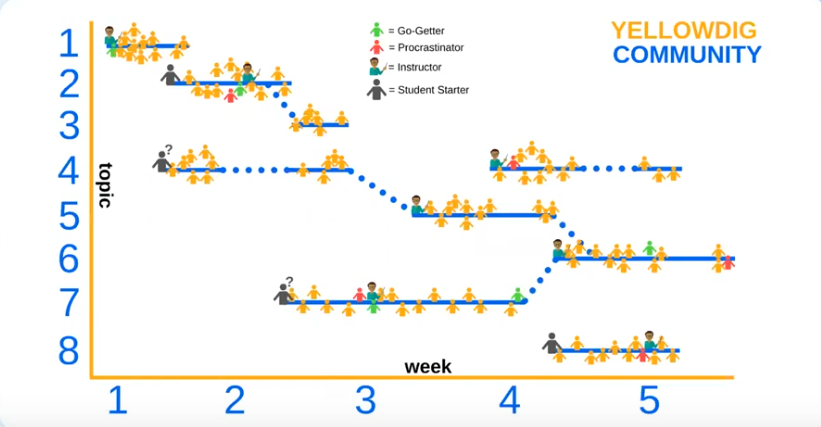
Consider these two visuals of two different types of discussion – “discussion assignments” vs “Discussion Community”.
Image taken from YellowDig video on How to Build YellowDig Communities. Here you see the ‘go getter’ slowly turning into the procrastinator because most students procrastinate toward the deadline for the discussion assignment.
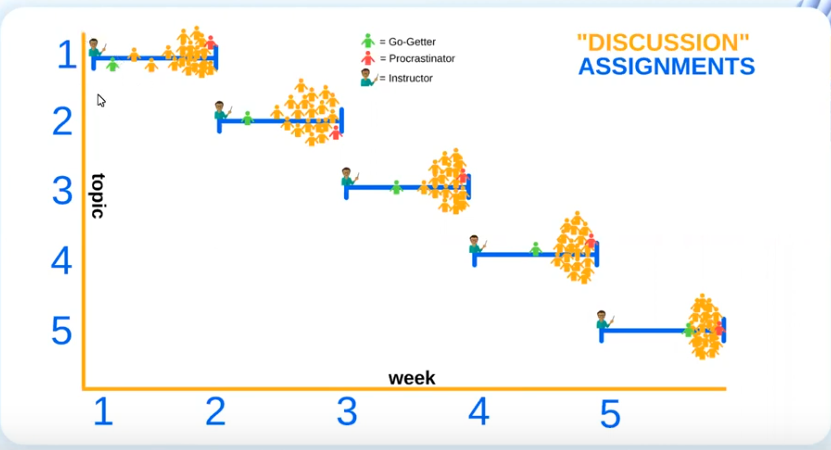
Image taken from YellowDig video on How to Build YellowDig Communities. Here you see a different type of interactive community where specific topic discussions can weave throughout the course and not end when each module ends. The go getter and the procrastinator are now all part of the discussion community.
Recent Comments