Posts

Lab 4 Q&A: Raster Geoprocessing

I’m having trouble creating a legend with correct labels for my maps in my layout. How do you change the name of the elements within a Legend? I can’t seem to change them from “0” and “1” to “developable” and “Off-Limits”. Is there some kind of transformation I should have done on the map before importing it to my Layout or is there a tool you can use within the layer interface.

Response: You need to enter it in the symbology for each element in the Layer. There will be a “Value” and a “Label” and you can alter the “label”.

Having just finished module 5, it became quickly apparent to me that I have a *very* tenuous grasp on the right tool for the job. Likely this will sort out with more use, but while the select by attribute (for vectors) and raster calculator (for rasters) are logical and pop into my head, the large collection of other tools is starting to muddle together. Some of this may be that there is more than one tool that can do a single job (though perhaps with varying efficiencies), some may be my newbiness (likely a large factor), but…

Is there a good way to choose the right tool for the job? While google/stack overflow can help with a given tool, if you don’t know to look for it or that something is even an option…??

Response: Right now you’re only using geoprocessing tools that I’ve already introduced (in previous labs & skill checks). If I don’t provide explicit instructions on how to do something, it’s because you have already used the tool(s) in previous work. While searching for options is always a good way to learn from the insights of others, you’d likely benefit just as much from reviewing the tools / approaches you’ve used before (but in a different context). I agree the options can be overwhelming, and a big part of narrowing the options is experience. My goal for you in this course is not for you to be an expert on every tool in the kit. Rather, I’m introducing you to a number of approaches for combining, sub-setting & summarizing data with a more limited set of tools. Limited in number BUT more than capable of processing different types of data for different purposes. Remember that 8 weeks is a short amount of time and there’s a lot of “language” to learn.
Intro Lab 3: Vector Geoprocessing

This page features troubleshooting questions students have asked for Intro to GIS Lab 3: Vector Geoprocessing

Q: Lab 3, Part 4, Step 5: I have successfully opened the Vt_USDA_Zipcode table, but when I hover over the button to add a field, it is unavailable. It says “the table or its schema is in read only” and I checked the properties and found that that is true, and under Metadata it says ” Show metadata from data source (read only) ” and I don’t know how to fix that?

A1: I honestly don’t know why you would receive any permissions related messages with the table. I’ve used this data in various labs throughout the years, and have never had that happen. Would like to try to figure that out though, because it really was not part of the lesson plan for you to grapple with permissions. You cannot edit the structure of a table that is not stored in a geodatabase. Once you import a table into a geodatabase you have full control over it. That said, if you make a change to the table structure (i.e. add or delete an attribute) you do need to save your changes. In the image below, note that you see two different save options. One in the top left corner (third icon from the left) and the other on the Fields Tab in the Changes Section. The latter of these is the Save button you need to “commit” to the changes you’ve made in your table structure.

A2: Curious about “incorrectly uploaded all my shapefiles”. There are two ways to get your shapefile into a geodatabase: 1) right-click the geodatabase and choose Import > Feature Class (or Feature Classes if you have more than one to import) and 2) right-click the shapefile and choose Export > Feature Class to Feature Class (or Feature Class(es) to Geodatabase). Either approach yields the same result. From there, you can add your data to a Project in several different ways, again, all ending with the same result

Q: I really didn’t understand how to tell the difference between length and shape_length or which one to use. At the end when there was only 1 record selected, I thought that couldn’t possibly be correct because the question stated “records” plural. I spent several long hours re-doing the lab with much frustration, only to realize too late I was right the first time. I could have used clearer instruction.

A: The Shape_Length attribute is a system field created by ArcGIS (just like OBJECTID and Shape_Area) when you import data into a geodatabase. A vector point geodatabase feature class only includes OBJECTID (the unique value assigned by ArcGIS to each feature in a dataset). A vector line geodatabase feature class includes OBJECTID and Shape_Length (the length of each line segment in the units of the data’s projection. A vector polygon geodatabase feature class includes OBJECTID, Shape_Length (which in this case is actually the perimeter of the polygon) and Shape_Area (the area of each polygon). Both Shape_Length and Shape_Area are measured in the units of the data’s projection. You cannot create, delete or update any of these fields. Unless there is some compelling reason not to use these measurements, Shape_Length and Shape_Area will always be the definitive measures because they are updated any time a change is made to the features in the dataset (e.g. via union or intersect). Sometimes, like when you’re working with land parcel data, there is a legal description which specifies the area of the parcel. This is a case where you defer to the legal definition of area instead of the Shape_Area attribute.

Q: Why were shape_length and length so different? is there a way to tell how an attribute value is calculated? sometimes I look at an attribute and the values assigned to it and I don’t understand the relationship or what the attribute is describing, espicially if the name of the attribute is vague

A: Occasionally you will find legacy attributes / measurements that were created with the original data, but never modified as the data were updated over time. That’s why the Shape_Length and Shape_Area fields are important to use. They are updated every time a geoprocessing operation is run. Otherwise you would read the metadata (the data documentation) which you’ll learn about in Module 6. For now you’ll just have to trust me on the interpretation of any attributes that you use (beyond the system fields identified earlier: OBJECTID, Shape_Length, Shape_Area.

Tips & Tricks: Things I discovered this week. If I press the ‘alt’ key and then click on a feature class under the Contents tab -> the map pane will zoom or pan to that feature. If I click within the map pane on a particular feature – and a little neon green dot appears and then disappears – a popup window will provide some essential information about that feature without having to look at the attribute table. One can also highlight and copy information from the popup window easily for later reference or to make it larger because I probably need reading glasses. I figured out that if I click to highlight a feature class within the Contents tab -> use ctrl + t -> the attribute table will appear for that feature class. Then I realized if I hover over some of the items in the menu after “right clicking” keyboard shortcuts are illuminated.

One tiny note the link below took a little massaging. When I tried to click over directly from the .pdf file the link was broken. Copy & paste the link into a text file indicated that there were some illegal spaces in the path.

http://pro.arcgis.com/en/pro-app/tool-reference/introduction-anatomy/anatomy-of-a-tool-reference-page.htm1

Lab 1 Q&A: Getting Started with GIS

This page features troubleshooting questions students have asked for Intro to GIS Lab 1: Getting Started with GIS.


Q: The data isn’t displaying within the map pane. Its just an empty topo map of Vermont. What am I doing wrong?

Answer: Your files will not disappear unless you actually delete them, so that should not be a concern. Other things to try if your data do not appear as expected: 1) check the Contents Pane to be sure they are included in the list of data; 2) if the data is listed in the Contents Pane, right-click the layer name and choose Zoom to Layer – this will help identify if there is a spatial alignment issue (i.e. there’s a problem with the coordinate system); and 3) check the Symbology – sometimes ArcGIS chooses a color that’s hard to see as the default symbology for the data layer – right-click the data layer from the Contents Pane, choose Symbology, and select a color (scheme) that will show up against your Basemap. This is not an exhaustive list, but between the suggestion provided by Peter and this short list here, you should be able to solve most problems of this nature.

The instructions for this lab have been very clear and easy for me to follow. At one of the very last steps, however, I’ve run into issues. I changed the coordinate system to WGS 1984, and then all of a sudden my Residential Location layer disappeared from the map, despite being checked in the contents pane. I’m now getting an error saying “Layer does not have a feature”. I’ve tried playing with the symbology and different coordinate systems but nothing seems to be working. Any advice?

Answer: Confirm that you set the Coordinate System to WGS 1984 Web Mercator Auxiliary Sphere and not just WGS 1984? They are different. If you want to include a screenshot of your error message, that sometimes can help me provide more targeted advice.

Module 8: Final Project and Presentation Preparation

This page features troubleshooting questions students have asked for Remote Sensing Foundations Module 8: Final Project and Presentation Preparation.

Length of Presentations, Final Presentations

Question: I made a video of my presentation, and unfortunately it’s 13 minutes. To cover everything asked for and answer all the questions, it will be hard to cut it back. So before I start to slash and burn through this presentation — how strict is the 6-8 minute time limit? 

Answer: We prefer you to stick to the 6-8 minute time limit. It should be possible given what should be included per the assignment. It’s okay to cut back on details and keep it to higher level information. Pretend you are explaining the project to some friends at a dinner party. I usually use the one slide per minute rule (if you are using slides).

Threshold gone wrong?, Q & A, Final Presentations

Question: Hi everyone! I was looking for insight about a threshold I’m doing. I’m trying to run a threshold as well as a subsequent mask based on my image’s slope calculation. However, the threshold I’m running is only working for elevation! I can’t figure out how to specify slope any better than what I have… Here’s my code:

var DEMslope = ee.Image(‘slope’);
var DEMslope = DEM.clip(geometry);
var threshold = DEMslope.gte(10).and(DEMslope.lte(21));
Map.addLayer(threshold, {palette:[‘white’,’red’]},’Potential Esker Slope’);
var mask = threshold.updateMask(threshold);
Map.addLayer(mask,{palette:[‘purple’]},’Potential Esker Slope Masked’)

Any additional insight would be appreciated 

Answer: Is this your full code? If not, can you share the code link (here or on email)? Sometimes it’s better to see the whole thing for some context. For thresholds, as long as the integers you are using are within the bounds of the range, it should work okay. From what you’ve posted it seems that you are using the slope threshold to create a mask? Are you trying to mask out values beyond the range of your threshold??

Module 6: Terrestrial Applications: Forest Degradation and Deforestation, Active Fire Monitoring, and Wildlife Applications

This page features troubleshooting questions students have asked for Remote Sensing Foundations Module 6: Terrestrial Applications: Forest Degradation and Deforestation, Active Fire Monitoring, and Wildlife Applications

A3.5 Error Help, Q & A

Question: I am working through the second GEE tutorial this week and am stuck because I keep getting the following error message:

“Cannot find required script: projects/gee-edu/book:A3.5 Forest Degradation and Deforestation/palettes”

I have made sure that this types exactly as the textbook shows and have also tried just copy/pasting and both methods bring me the same error message. Not sure how to fix this any help is appreciated!

Answer: I will look into this – This seems like a textbook error. I’ll write an announcement to the class and post here when I have a fix!

Try to cut and paste this at the top of your code script:

var ndfiColors =
‘FFFFFF,FFFCFF,FFF9FF,FFF7FF,FFF4FF,FFF2FF,FFEFFF,FFECFF,FFEAFF,FFE7FF,’+
‘FFE5FF,FFE2FF,FFE0FF,FFDDFF,FFDAFF,FFD8FF,FFD5FF,FFD3FF,FFD0FF,FFCEFF,’+
‘FFCBFF,FFC8FF,FFC6FF,FFC3FF,FFC1FF,FFBEFF,FFBCFF,FFB9FF,FFB6FF,FFB4FF,’+
‘FFB1FF,FFAFFF,FFACFF,FFAAFF,FFA7FF,FFA4FF,FFA2FF,FF9FFF,FF9DFF,FF9AFF,’+
‘FF97FF,FF95FF,FF92FF,FF90FF,FF8DFF,FF8BFF,FF88FF,FF85FF,FF83FF,FF80FF,’+
‘FF7EFF,FF7BFF,FF79FF,FF76FF,FF73FF,FF71FF,FF6EFF,FF6CFF,FF69FF,FF67FF,’+
‘FF64FF,FF61FF,FF5FFF,FF5CFF,FF5AFF,FF57FF,FF55FF,FF52FF,FF4FFF,FF4DFF,’+
‘FF4AFF,FF48FF,FF45FF,FF42FF,FF40FF,FF3DFF,FF3BFF,FF38FF,FF36FF,FF33FF,’+
‘FF30FF,FF2EFF,FF2BFF,FF29FF,FF26FF,FF24FF,FF21FF,FF1EFF,FF1CFF,FF19FF,’+
‘FF17FF,FF14FF,FF12FF,FF0FFF,FF0CFF,FF0AFF,FF07FF,FF05FF,FF02FF,FF00FF,’+
‘FF00FF,FF0AF4,FF15E9,FF1FDF,FF2AD4,FF35C9,FF3FBF,FF4AB4,FF55AA,FF5F9F,’+
‘FF6A94,FF748A,FF7F7F,FF8A74,FF946A,FF9F5F,FFAA55,FFB44A,FFBF3F,FFC935,’+
‘FFD42A,FFDF1F,FFE915,FFF40A,FFFF00,FFFF00,FFFB00,FFF700,FFF300,FFF000,’+
‘FFEC00,FFE800,FFE400,FFE100,FFDD00,FFD900,FFD500,FFD200,FFCE00,FFCA00,’+
‘FFC600,FFC300,FFBF00,FFBB00,FFB700,FFB400,FFB000,FFAC00,FFA800,FFA500,’+
‘FFA500,F7A400,F0A300,E8A200,E1A200,D9A100,D2A000,CA9F00,C39F00,BB9E00,’+
‘B49D00,AC9C00,A59C00,9D9B00,969A00,8E9900,879900,7F9800,789700,709700,’+
‘699600,619500,5A9400,529400,4B9300,439200,349100,2D9000,258F00,1E8E00,’+
‘168E00,0F8D00,078C00,008C00,008C00,008700,008300,007F00,007A00,007600,’+
‘007200,006E00,006900,006500,006100,005C00,005800,005400,005000,004C00’;
exports = {
ndfiColors : ndfiColors
};

EVI Calculation for Landsat 7, Q & A

Question: Last week I tried multiple methods to calculate EVI for my EVI image. Not sure any of them were right because the results all looked different and not quite right to me.

But one of the big questions lingering for me is what to use to calculate EVI for Landsat 7. When I used the formula that was in the lecture and generally suggested in an Internet search, the results were way off. Then I found a Landsat 7 specific equation for EVI here. It suggested using: EVI2=2.5*((NIR-Red)/(NIR+2.4*Red+1))

Are there different methods to get EVI for each satellite dataset? Does this method address the issue raised here about the reduced image not having a projection and needing to set the scale? Or something else?

Answer: First, I think your code looks good. But as far as Landsat 7 goes, after following the link to the research gate link you gave, I do believe there are multiple ways to get EVI for multiple datasets and it depends largely on what dataset you are working with, some of them are just shortcuts as well.

It may be easier to stick with exactly what the lecture says to do with EVI and then try working out the kinks through there instead of using the reduced image way. This way you can work backwards to try to get it resolved if it’s still not looking right.

Question (part 2): Thanks very much for this. I’ve kind of given up on it for now. I was unable to get it to work using the method in the lecture — the scale was wrong (as best I can understand from what I read) as applied to Landsat 7. So the range I got for EVI was much much greater than -1 to 1. And I tried a bunch a stuff that didn’t work, but this method I found worked — to the extent that it was the only way I got a resulting range for EVI that made sense. I’ve given up on it though because I’m not sure it’s correct and figuring it out will take me a lot more time. Having already put in over 20 hours on that tutorial, I had to move on. I do hope to learn it someday. I could probably use it in my project, since I’m reliant on Landsat 7 there, too (Landsat 8 does not include the full period that I’m interested in).

Answer part 2: Yes, there are numerous ways to calculate EVI, depending on the dataset and bands. The difference between using filter and applying a reducer for median is mainly that you wouldn’t want to use median( ) when you are filtering your collection if the collection or area of interest is very big because you might run into memory errors on GEE. If you look here, you will see that both methods are fine and yield similar results (there is always some error associated) , but using .median( ) is a shortcut, and not advised when datasets are large. For the ways that you and the tutorial calculated EVI, I agree with Alejandro in terms of which to use here. I think NDVI is also going to be a better index for you to use for crops for your project. I hope this helps!

Module 5: Image Series Interpretation: Image Collections, Image Compositing, Change Detection

This page features troubleshooting questions students have asked for Remote Sensing Foundations Module 5: Image Series Interpretation: Image Collections, Image Compositing, Change Detection.

Question about this assignment, EVI Image

Question: The assignment says to “reduce the image collection to find the median EVI.” I am having trouble figuring this out. Is the process to calculate EVI for each image in the collection and then get the median for all of them. Or is to the get the median for bands that are in the EVI calculation. And then calculate EVI with those median numbers. Maybe you would get the same answer either way (not sure on the math of that—would have play around with some examples).

Answer:  You’re going to use imageCollection.reduce ( ) along with the ‘median’ input and it should calculate it for you automatically. I found this that could help!

Question (part 2): Thanks, I will try using this. I did not know about .reduce. My question though is I think more conceptual — it’s about how we are doing this mathematically. If you have an image collection of 20 images and you want to get a median EVI on it (as we do for this exercise, if I understand it correctly) — are we getting the median value of each band and then calculating EVI with those medians for the reduce image? Or are we calculating EVI for each image and then taking the median for the reduced image? The former seems to me like it might be more mathematically correct, but I’m not sure. And then is that what the .reduce.median function will do? If I understand what it’s doing, I think it will help me to figure out the coding better. For now, I keep getting confused because I’m not sure which of those two things we’re trying to do. Let me know if you have an explanation for that conceptual question. Thanks. 

That guide was a helpful explanation. It does say that we are creating an image with median values for each pixel for each band (if I understand it correctly). And I assume we are then to calculate the EVI from those medians. (Rather than doing EVI first for each image.) But I want to get clear on why we do it in that order from a conceptual or mathematical perspective. Let me know if you have any thoughts on that.

Also that guide says: “In particular, note that images produced by reducing an ImageCollection have no projection. This means that you should explicitly set the scale on any computations involving computed images output by an ImageCollection reduction.” Do we need to address this? I don’t think any of my code addresses scale for the computations? (Unless it’s build into the EVI formula?)  Any thoughts about scale in EVI computation?

So reading through this again, I’m not sure if I actually reduced my image either. I did this:

var WebbFarmImage = Landsat7
.filterBounds(WebbFarm)
.filterDate(‘2012-04-25’, ‘2012-10-25’)
.filterMetadata(‘CLOUD_COVER’, ‘less_than’, 50)
.median( );

It gave me an image the median values for each band (I think). But is it the same as the method you suggested?

Plus, I’m still not sure about the math — is calculating the EVI from the medians for the component bands from the image collection the same as calculating EVI for each image and then taking the median EVI?

Answer (part 2): I’m reading through the thread here. When you reduce an image or an image collection (you can do both) you are basically aggregating data. This can be done over bands, over time, or over space in GEE. In this case (if I am understanding the original question above), you are taking an image collection and reducing it to one image with multiple bands. The ‘reducer’ that you are using is median. You will write a function to do this. 

In the code you pasted above, you were filtering your image collection by ROI, date, metadata and grabbing the median. This might get you the same answer as you would get by writing a function where your reducer is median, but it might not in all cases. It has to do with how GEE computes (and takes shortcuts in computing on a supercomputer to arrive at an answer). If you write a function to reduce the collection using ee.Reducer, you are stacking up the images in your collecting and then calculating the median per pixel and per band, arriving (hopefully!) at one multi-band image that is a composite of your date range. From this you will calculate EVI.

I see you posted ‘reducing and image collection’ above. ‘Reducer overview‘ is in the same content folder but has more of an explanation about what reducers are doing.

Cloud Mask, Q&A:

Question: I’ve seen a few people mention doing cloud masks. I’m curious to try that. Is that something we covered in a tutorial that I somehow missed? Or if you learned about it on your own — let me know where you found out how to do it. @Alejandro Prieto @Amanda Armstrong

Answer: We only discussed cloud-masking a little bit in the live session. We did apply a mask with ‘UpdateMask.’ Here is a good tutorial on how to apply masks.

Remote Sensing Foundations Module 4 Q&A: Image Interpretation: Quantifying, Masking, and Classification

This page features troubleshooting questions students have asked for Remote Sensing Foundations Module 4: Image Interpretation: Quantifying, Masking, and Classification

Question: At the end of the file when you are selecting an image for a certain day with Landsat 5, say at the end you see 20000606 in the code we build following the tutorial F1.1. This selects June 6, 2000, but I can’t tell from this example if it is YYYYDDMM or YYYYMMDD. The later makes more sense to me, but I can’t find it online in a clear way, because maybe Google fixed all the images to be more uniform with a certain format? 

Answer:  Its YYYYMMDD

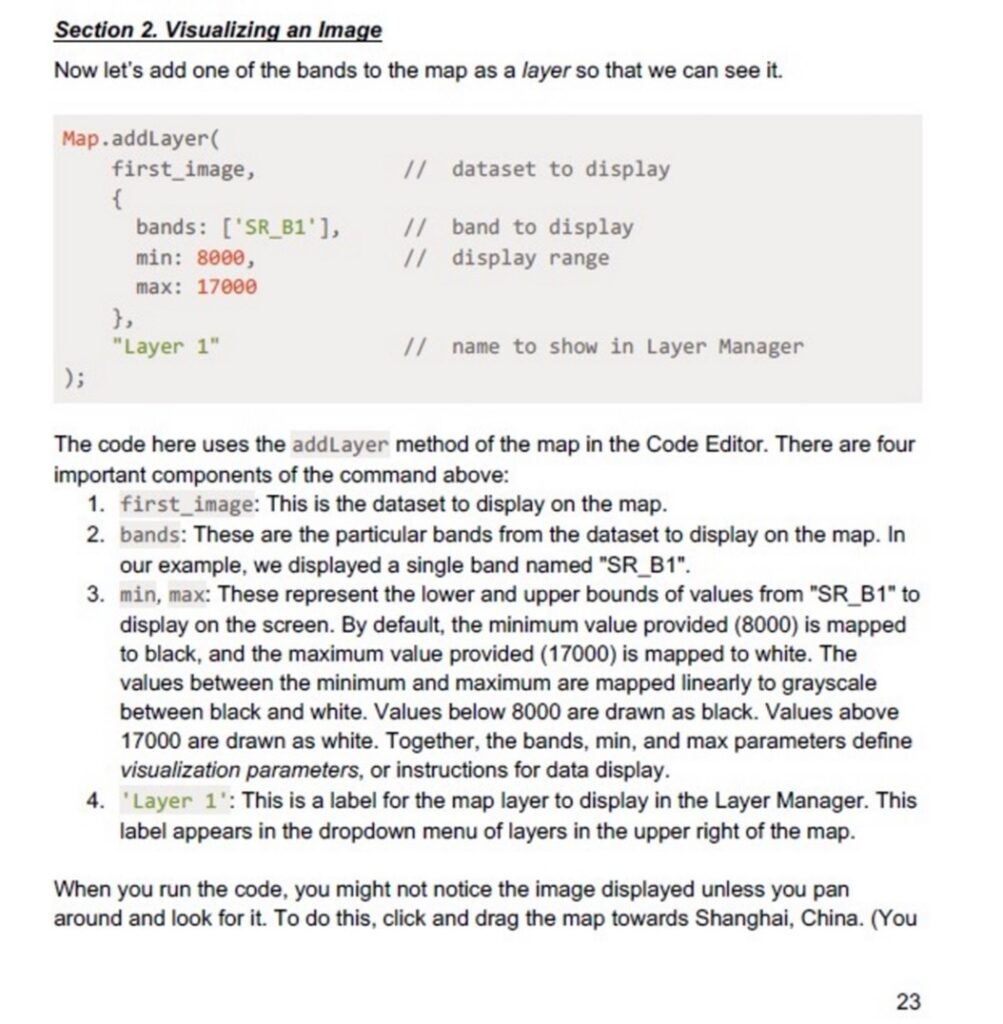
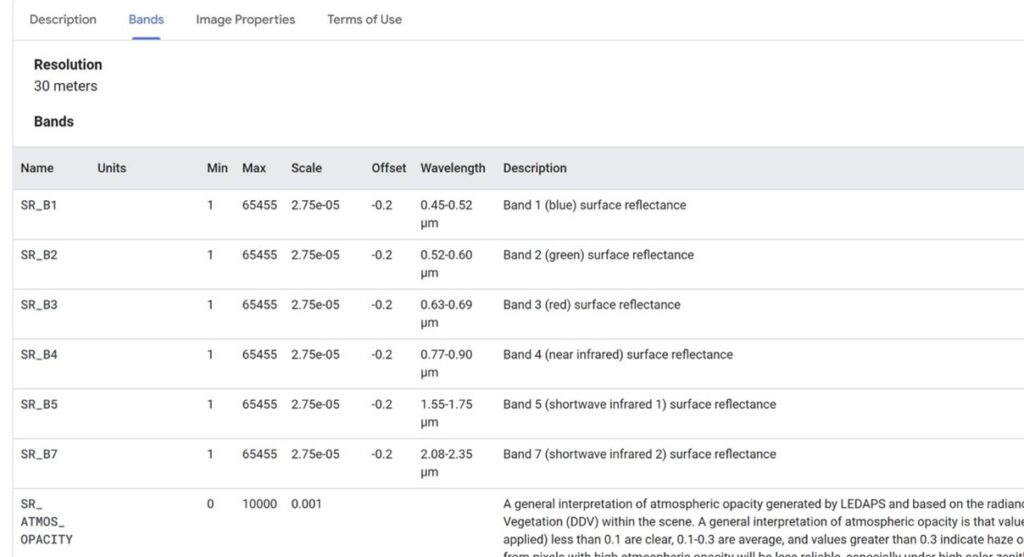
Question: I worked through the tutorial in F1.1 and I have a question about the visualization parameters described on page 23. In #3 on that page, “min, max” — The text says these numbers (here set at 8000 and 17000) represent the min and max value for band SR_B1. Where can I get that information for a different band or dataset? When I look in the bands information in the GEE catalog for this dataset (at least I think I have the right one) the min and max are 1 and 65455, respectively. Where do 8000 and 17000 come from? Here’s a link to the catalog page.

On the other hand, on pages 35-36, it describes the range for the nighttime lights data as coming from the catalog or ” with other Earth Engine methods. ” When I searched on this dataset in the catalog, it said it was not available, but when I did my own search for using similar terms, I came up with what I think is a match to this set. It’s min and max DO match what is listed on the bands tab in this catalog entry (0 and 63).

So why for the Landsat 5 are the numbers different from what is listed on the catalog page for min and max?

Answer: I think you are confusing image datasets. On pg 35 there is the line:

var lights93 = ee.Image(‘NOAA/DMSP-OLS/NIGHTTIME_LIGHTS/F101993’);

This is where you are importing a different dataset than Landsat 5, as you used earlier in this chapter to make the composites. Now, you are importing a new image to look at the nighttime lights. The range of this is as you say, found in the band information on the EE catalogue page. The next few lines in the tutorial are having you look at different night time images to compare.

Question: I loaded the nighttime lights dataset you reference. And that all works fine and the min and max match what I think is the correct catalog listing for that one. My question is about the Landsat 5 dataset on p. 23(ish) — why are the min and max 8000 and 17000? Those are not the numbers in the band tab in GEE catalog for that dataset: The min and max for that dataset at 1 and 65455 in the catalog, respectively. But we set them at 8000 and 17000 in the tutorial code. Why?

Answer:  I’m pretty sure this is done to skim off the minimum/maximum values, so you have more median values. Thus, the values are less linearly stretched and the bands now have “assignments” on how to organize themselves. If you put in 1 – 65, 455; you’d be jumbling up the data and there are no clear assignments for the bands. When you add 8,000 – 17,000; it also means that everything below 8,000 and everything above 17,000 now have an assignment.

Question: Ok but where did the numbers 8000 and 17000 come from? Why those numbers? How can I find such numbers to do this with if they are not in the metadata or catalog (as 8000 and 17000 are not)? Trying to figure out how to swim on my own!

And what do you mean by assignments for the bands? In this case the bands of interest all have the same min and max numbers — either the 1 to 65,455 as listed in the catalog or the 8000 to 17000 that are assigned in the tutorial. So how does that help split things out into bands if they all have the same min and max numbers?

AND what is the assignment that goes to everything above and below 8000 and 17000?

If I’m asking too many questions, please just direct me toward a reference or something. Again, just want to be able to do this on my own and I have no idea why 8000 and 17000 are the numbers that were used in this example. Would like to figure that out so I can do it myself. Thanks.

Answer: I don’t think I can fully answer your first parted question; these are just values that the tutorial decides is best. Most tutorials do this and make you input certain numbers at certain places.

Second part of your question is actually answered in that image you posted last. In step 3, it mentions “The values between minimum and maximum are mapped linearly to grayscale between black and white. Values below 8000 are drawn as black. Values about 17,000 are drawn as white.”

I know you are ambitious to get all of this and swim on your own. It’s great to see your interest in these topics. For now though, we’re simply following the tutorials and getting the fundamentals down which are; concepts, code and familiarization with tools/ideas. Those numbers chosen to set this range won’t come from an experienced user until probably years later.

Question: Thanks! I’ll take a look and glad to hear that we’ll be doing more of this later. That’s really good to know. Right now, I am working on this week’s assignment and having bigtime issues with this — part of why I’m asking. I’m trying to look at MSI data for an area of interest for the assignment and when I add the data to the map to see it, it’s all white! I’m using the min and max used in the tutorial for MSI data on p. 85 (0 to 2000). I’ve been messing around with those numbers, but I can’t seem to change much. And when I do — the numbers I put in there seem to have no relationship to what’s listed for those bands, and all the active farm fields are green instead of red (I’m making a IR false color composite). Totally confused and feel like I’m shooting in the dark to randomly pick these numbers for visualization. I’ll see if this helps. But let me know if you have any clues!! Here’s my code. I put the layers on the map — just to take a look at them — at the end. I’m also having trouble with another question I’ve posted here — how do I know which image is displayed by date in the map when I do this? It would be really helpful to know the date to understand it in terms of the crop year. I’m using the “first” function (I think!).

Thanks. That’s a very helpful perspective. I’m happy to do trial and error (though I still have an all white map!). I just feel like — when I’m guessing — that I don’t know what is ok to do. I could put in random numbers until something looks right, but will that be meaningful when anyone else looks at it? Will it be comparable to other maps made with the same information? I guess I’m asking — are there standard practices (for example, for a false color IR map)? Or is it ok to shoot from the hip in how I visualize it?

Answer:  With the white image is to load it into the map and do a 100% stretch on the visualization box…the tutorial has us coding everything thing, hard code, but you can also find the range by manually doing it on the map by clicking on the settings icon of the layer. By doing it manually, you don’t have to hard code anything. Hope this helps!

Question: I think I get it. Do you mean that by clicking on the 100% stretch in the visualization settings — that will fill the range (min and max) into the boxes? And then use those numbers? (Not sure what you mean by hard coding exactly.)

Also — I guess the min/max numbers in the catalog aren’t very useful then? That’s what I thought I should use. What do you think? Ignore them?

Answer: Great! And yes I meant by clicking the 100% stretch on the visualization settings. Hard coding is just using strictly code to get what you want – whereas here, you can use the settings directly built into GEE and use those numbers to fill min/max boxes.

The min/max catalog is only useful depending on what you’re trying to do. In this case, you can ignore them or choose to ignore them based on what you’re trying to perform.

Final Project Ideas, Q & A

Question: Identifying social hiking trails on federal public lands: It seems like remote sensing is a perfect tool to identify the prevalence of social trails (non-sanctioned hiking trails) when paired with a high enough resolution dataset. Would it be possible to apply this to a place like Joshua Tree National Park, CA or Calico Basin Recreation area next to Red Rocks in NV? Would anyone have suggestions for how to conduct this process or further how to measure the mileage of social trails vs. approved trails? Is that even a function in GEE? Potential for Wildfire impacts to recreation resources: Curious if folks have any ideas regarding looking at historical wildfire in a region and comparing that to current vegetation in a landscape? This could be useful or considering active forest management plans and comparing with recreation resources on the ground?

Answer:  I may be able to help a little with this one. I was lucky enough to do multiple timber cruises/inventory for state forests here in CT along with other foresters. One thing that is always reoccurring with ideas within Forestry are: invasive species, recreational use, fires and certain tree regeneration capacities. That being said, the idea you have are good but let me know if something really stands out to you or if you can zero in on something more specifically. This way, we can circle back and see what can work. I think these ideas are both doable, especially the wildfire data.

Remote Sensing Foundations Module 2 Q&A: Sensors on the ground and in the sky

This page features troubleshooting questions students have asked for Remote Sensing Foundations Module 2 Q&A: Sensors on the ground and in the sky.

Question – Selecting multiple lines for comments with ctrl + /: I’m having trouble learning the shortcut on page 14. When I select several lines and hit ctrl + /, nothing happens. Maybe it’s my computer? Or I could be interpreting the instructions wrong. I don’t mind typing double / on each line, however I see how this shortcut could save time when debugging. Anyone have ideas?

Answer: This may be a Mac/PC thing. I am on a Mac and I highlight the block of code/text that I want to comment out and press ‘command’ + ‘/’. If I press it once it is commented out, if I press it again, it is uncommented. Basically ‘command’ + ‘/’ is a way to turn on and off code lines in your script.

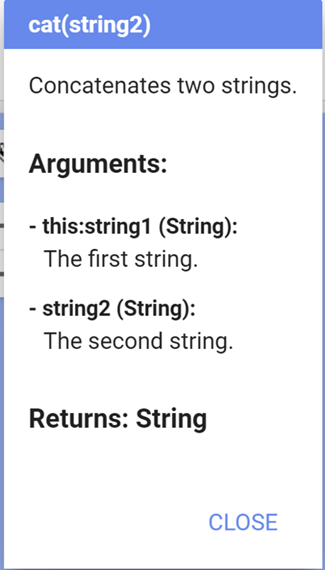
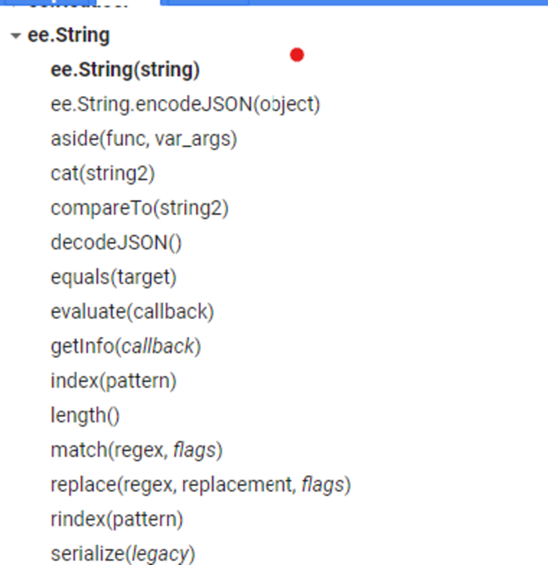
Question- Java Syntax, Q & A: I’ve worked through the textbook tutorials and the option reading on Java code in the course materials. I’m still a bit confused about how to put things together. For example, I tried out the assignment on p. 18 since I’ve never coded in Java before. The doc tab shows two arguments for cat(string2), but I’m not sure where those arguments go. To me, it looks like cat(string2) only has one argument. In the explainer notes for cat, it names one of the arguments “this: string1”. What is “this”?

I got it to work with this code:

var mission = ee.String(‘Sentinel’)
var satellite = ee.String(‘2A’)
var missionName = mission.cat(satellite)
print (missionName)

To do this, I was kind of just modeling off of other things I saw. And I’d like to understand it better than that.

I think that maybe ee.String is the ee object (?) here, And then you add something to it by putting a period after something (what kind of thing?) and then it seems to work.

So, are the functions those things listed under Docs at the first level (e.g., ee.String with a drop down arrow by it)? And then the things you put after the period (not sure what to call them) are the things listed under the drop-down arrow? But ee.String is listed there, too? How do you use this period stuff to string things together? Do you always start with an ee.thing and then add the other stuff to it after periods?

Answer:

There are some great online resources that can do a far better job of explaining what these different java script code components are. Strings are one way of storing objects, typically information in text (with single or double quotes depending on their use/meaning) or number form (no quotes).

I think your code looks good and you made the assignment work! In it you were basically telling it that you had two pieces of information that you wanted to join together, and you used concatenate to join them. You could get the same result by using print(‘Sentinel2A’), but since that is just a string of text to print, it would not be stored or useable in another way, as it is if you create a variable to store it. Variables are also containers or information. They can be strings, text, numbers, equations, images, collections, and more. The ‘ee’ signafier just stands for Earth Engine…Google’s just putting it’s stamp on the javascript resources.

Here is a good resource that should help your understanding javascript in the context of GEE,

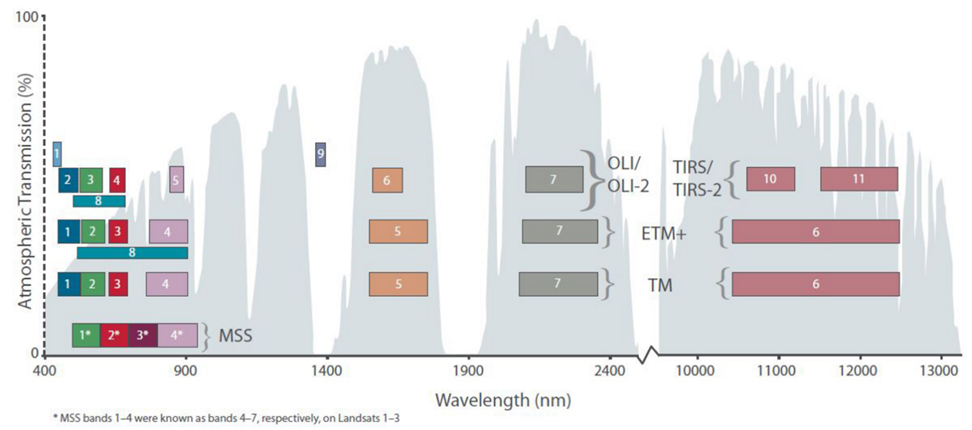
Question Bands to Colors: In the second chapter of the textbook, it says that bands 3, 2, and 1 and corresponded to red, green, and blue, respectively (I’m assuming), for Landsat 5. As well as NIR being band 4 and SWIR, band 5. Is this the case for all Landsat missions as well as multi- and hyperspectral sensors? Or does it differ from sensor to sensor?

Answer: Here (below) is a figure that might help. And an article. Essentially, band designations can and do vary between sensors, it is always a good idea to go into the EarthEngine data catalogue and read about which bands are which when you are looking at a new dataset. In the case of Landsat, for the most part the wavelength ranges that are common across sensors are the same but the band numbers can be different, depending on what is included in the two Landsat missions that you are comparing (i.e. Landsats 1-3 MSS are same but different from Landsats 4-5 MSS). In the figure I pasted (it’s also on the lecture slides) you can see that there are alot of similarities in band ranges of the different Landsat missions. The figure gives wavelength ranges for each of the

Finally, here is a fun band combination graph that highlights band differences between Landsat sensors.

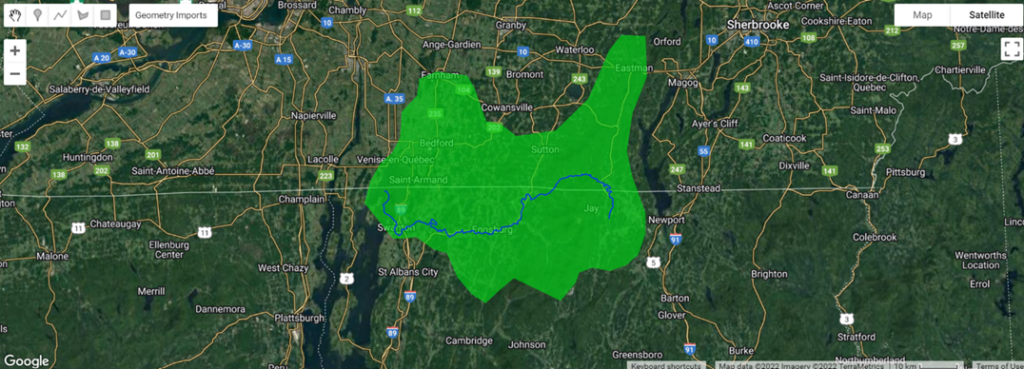
Question Region of Interest: I’m curious whether you can import shapefiles to GEE, because I have used shapefile polygons for Lake Champlain sub-basins before in ArcGIS Pro.

Answer: Yes! You can definitely import shapefiles directly into GEE. Here is a link showing how. And you can definitely use remote sensing to track algal blooms! Here is a case study from 2012.

Question Share GEE Code: How do I share my GEE code link?

Answer: The way to produce a hyperlink of your script in GEE is to click “Get Link” at the top of your script (blue box). It is next to the “Save” button. Make sure you ‘get link’ AFTER you save your code because it will produce a link from the last code save. It’s basically sending bits of code that are a snapshot in time…So for instance, you might produce a code that can do one thing and then send a link to that. If you keep working on that script though, I won’t see updates unless you send a new link. I hope that makes sense!

Remote Sensing Foundations Module 1 Q&A

Remote Sensing Foundations I: Quarks to Spectra

Question: I’m not sure I understand amplitude when it comes to wave energy. As I understand it, amplitude is the height of a wave, and higher amplitude means higher energy. But on the slides (the one with the equations and the one with the EM spectrum) — energy relates to frequency and wavelength. How does amplitude figure in? Are high frequency/low wavelength waves also high amplitude?

Instructor Answer: To put it simply: Yes, amplitude and energy are directly related. The higher the amplitude, the higher the energy that is prompted. Amplitude is the size of the wave, from its peak. That being said, there are 2 ways to change it; movement or distance a.k.a. frequency and wavelength. You can have high amplitude and low frequency by increasing wavelength.

Imagine beating a drum at a constant rate, say 60 bpm or one beat per second. Now without hitting the drum any harder, double your rate to 120bpm or two beats per second. Your energy has doubled without your amplitude increasing – your frequency has doubled, wavelength halved, but each wave isn’t carrying more energy. Now go back to one beat per second, but hit the drum twice as hard. Now your energy has doubled without changing frequency, and each wave (or beat) is double the original amplitude, and carrying twice the amount of energy. So basically, energy increase is not necessarily uni-directional.

Question: Quarks: The video starts out talking about quarks and their importance of understanding energy. When it gets to the electromagnetic spectrum, you mention photon energy. What are we actually measuring when we sense electromagnetic radiation — energy at the quark level, the photon level, something else, all of the above? What’s the role of quarks when we’re doing remote sensing?

Instructor Answer: Electromagnetic radiation has to do more with energy from Photons directly. I think you are confusing the role that quarks and photons have in this case. Remember that electromagnetic fields and photons are really just relating to the same phenomena. Quarks are simply electrically charged so that’s why they interact with magnetic fields. Also remember that Quarks are not actually able to be observed because of color confinement. Understanding quarks simply helps with understanding concepts that have to do with remote sensing. Don’t think too hard in relation to remote sensing yet! These are just building blocks to help understand the functions of remote sensing down the line.

For Google Earth Engine — the video by Dave Thau says it’s free to use for non-commercial applications. In your experience, does that include university research? I would think so, but you never know.

Google Earth engine is free.

Skip to toolbar