Archive for the ‘Logging Hours’ Category

Tutors,

From the PeopleSoft login page:


“The Financials and Human Resources PeopleSoft Systems will be unavailable from 4:30pm

on Thursday November 1st through the start of business on Monday, November 5th.

Note that time submission and approval is currently unavailable as we prepare for the system

upgrade.”


You will not be able to submit time until the morning of Monday, November 5th. Please, keep track of your hours until then.

Thanks,
Keith

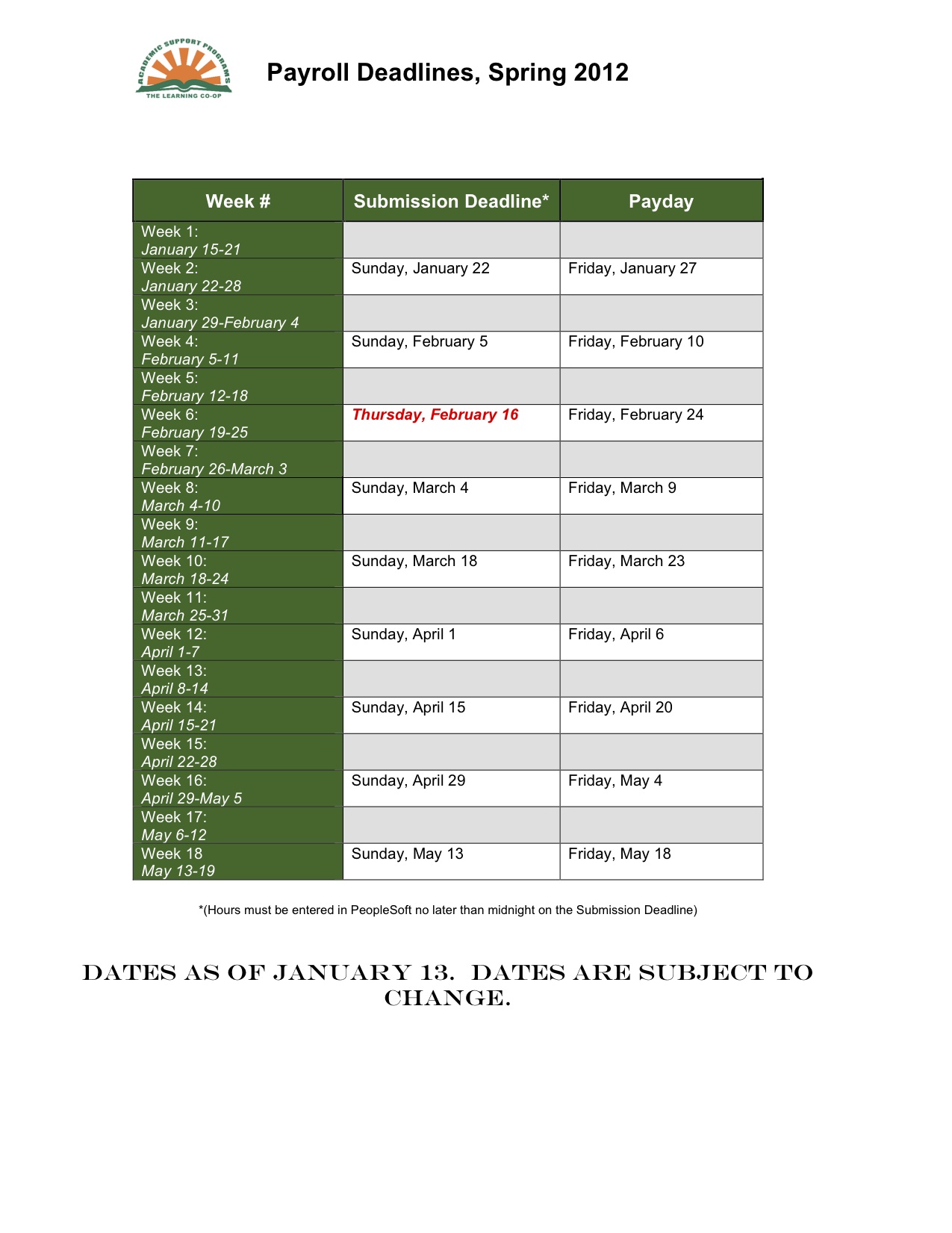
Spring Semester Payroll Deadlines

To help ya’ll keep on top of logging session records and entering your hours into PeopleSoft, feel free to refer to the chart below.  I’ll continue to remind you of payroll submission deadlines in my weekly emails, too.

TUTORTRAC IS DOWN TODAY!

Hello, Tutors–

TutorTrac is currently down.  Since you will be unable to check your schedules, if you are scheduled to work in the Co-op, please come in!  We have no way of checking whether or not you have an appointment prior to the session start time.

Also, we will need to keep track of all sessions using a paper session record system today.  Both Co-op based and Campus-Wide appointments will need to be recorded using this paper system!  Detailed instructions as to how this will work can be found on the blog here: http://blog.uvm.edu/subtutor/2011/09/09/payroll-forms-and-procedures/

Thank you!

–Rachel

Payroll Forms and Procedures: What Do You Need to Record a Session?

Hi, everybody!

Just wanted to let you all know that TutorTrac is back and fully operational (we hope) as of today. You may disregard the paper scheduling system and, as per usual, record your sessions in the following manner:

For Campus-Wide Appointments:

1. Create a “Quick Visit” in TutorTrac to create a record of the session. Be sure to fill in all of the fields.

2. Enter the hours you have worked into PeopleSoft. Be sure they match the date and number of sessions you have reported in TutorTrac.

For Co-op Based Appointments:

1. Be sure to check your schedule on TutorTrac no more than an hour before your scheduled availability.

2. When you meet with a student, return to your schedule to mark the session as attended and to complete your notes in the session record.

3. Enter the hours you have worked into PeopleSoft. Be sure they match the date and number of sessions you have reported in TutorTrac.

For Drop-In Group Tutors and SI Leaders:

1. You will need to have all students sign an attendance sheet for each session you have. We will log the sessions into TutorTrac here in the Learning Co-op; you do not need to do this.

2. You will need to submit a work summary report before the end of each pay period.

3. Enter the hours you have worked into PeopleSoft. Be sure they match the date and number of sessions you have reported in TutorTrac and on your work summary report.

For Work-Study Tutors:

1. Follow the directions as indicated above.

2. For Co-op based appointments, remember you are required to show up and get paid for all availabilities, even if no one schedules an appointment with you.

3. You will need to complete a paper work summary report (found by the printer and on the blog) each week and submit it to Rachel.

4. You will need to enter your hours into PeopleSoft weekly.


Thanks, and have a great first week on tutoring!

Payroll Forms and Procedures (Emergency Paper System)

Hello, All–

As long as TutorTrac is down, we will need to keep track of sessions using a paper recording model.  For each session, you will need to complete a Session Record.  At the end of each pay period, you will need to submit a Work Summary Report along with your session records.  The hours listed on the Work Summary Report will need to match the hours you enter in PeopleSoft.  For a more complete summary of the paper recording system, look HERE.